Use the Complement to the CCQ coverage calculator to determine any gaps in coverage for someone insured under the CCQ plan.
You can find this in the
illustration tool, under the
Strategies tab, in the
Quebec construction workers menu.
Once you’ve done the calculation, you’ll be able to choose the amount to offer and produce your illustration.
How to use this calculator
- Click on the
Strategies tab
- Open the
Concepts section
- In the
Quebec construction workers menu, select
Complement to CCQ coverage
- Download the calculator by clicking
Export to Excel.
Open the downloaded file through your browser or in your
Downloads folder
You have 60 minutes to open the file and access the data in the illustration. After that, you'll have to download the spreadsheet again. - 5. Activate content and macros.

- This screen will appear for the selected product
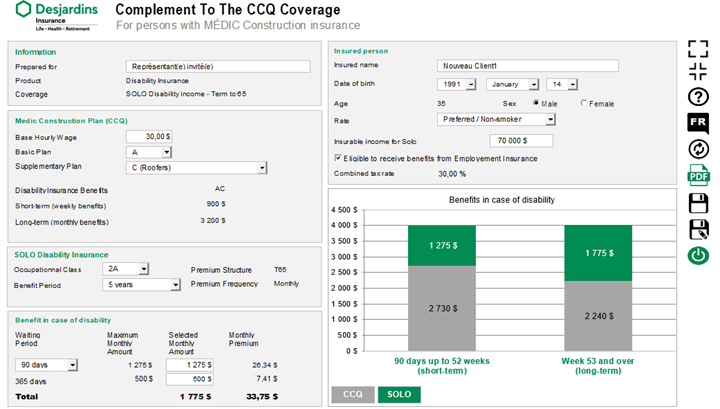
- Check that the proposed insured’s information and the insurance coverage are accurate. You can change this information directly in the Excel file if you need to.
- Enter the information specific to the MÉDIC Construction plan for the proposed insured. The graph will automatically adjust based on the information entered, and the maximum amount available for SOLO Disability Income will be displayed.
- Click the PDF icon to generate the report.
- Once you’ve determined the SOLO coverage amount, produce your illustration and add the additional coverage, if applicable.